Signatures are used to match functions in binaries that were stripped and are therefore missing function names. VulHunt currently supports Fast Library Identification and Recognition Technology (FLIRT) signatures created by Hex-Rays and used by IDA Pro, however, we are actively working on support for other engines that are more accessible to community edition users. In this section, we’ll cover how to create and apply signatures.

Creating signatures

There are multiple ways to create FLIRT signatures. An easy way is using IDA Pro interactively or programmatically. We’ll cover these options now.

IDA Pro

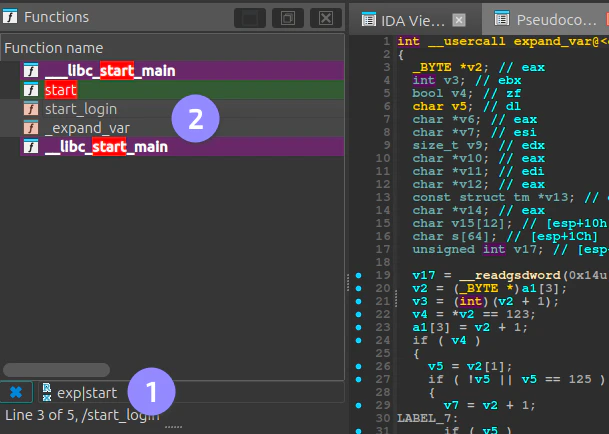
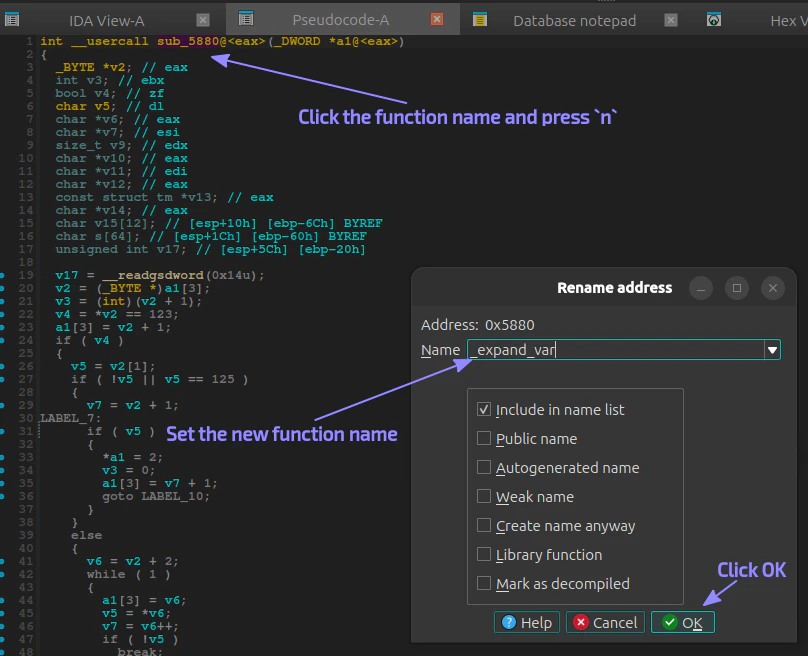
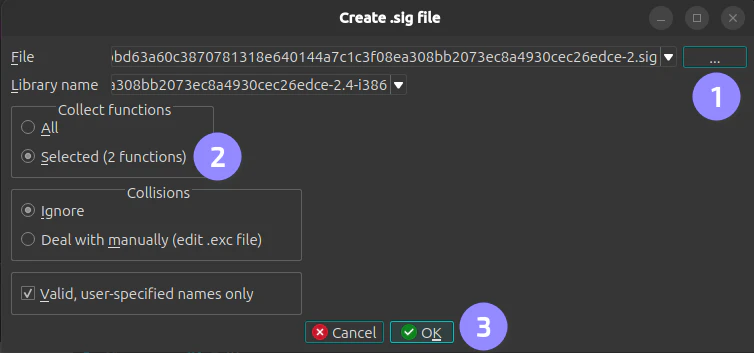
If you have IDA Pro, you can use it to generate signatures. The first step is to set the right names for functions of interest (the ones that will be used in rules) as the image below shows. After renaming all functions of interest, find them in the Functions window and select them (hold Ctrl key for multiple selection): Then, go to File ▸ Produce ▸ Create SIG File..., set the output path and make sure the option to create signatures only for the selected functions is checked before clicking OK: The generated SIG file will contain the signatures for the selected functions.
IDA Domain API

This is a new Python API shipped with IDA 9.1.0 or later. The manual process above can be automated by the following Python script.
Before running the script, make sure you have a copy of the IDA database (.i64 file) as this will be overwritten.
create_signatures.py
from ida_domain import Database
from ida_domain.database import IdaCommandOptions

ida_opts = IdaCommandOptions(new_database=True)

# functions we want to create signatures for
# (you might want to add logic to find these functions
# programmatically).
functions = {
    0x4bd0: "start_login",
    0x5880: "_expand_var",
}

print("[+] creating database")
with Database.open('my_file', ida_opts) as db:
    for ea, name in functions.items():
        f = db.functions.get_at(ea)
        if f:
            print(f"[+] renaming {f.get_name()} to {name}")
            db.functions.set_name(f, name)

    print("[+] removing all other functions")
    for f in db.functions.get_all():
        if not f.start_ea in functions:
            db.functions.remove(f.start_ea)

    print("[+] creating signatures")
    sigs = db.signature_files.create()
    print(sigs if sigs else "error creating signatures")
The above script will generate a SIG file and a PAT file. You can make sure the signature is correct by checking the contents of the PAT file.
The db.functions.get_all method from the IDA Domain API does not return functions such as deregister_tm_clones and a few others. As a result, the script does not remove them from the database before calling db.signature_files.create(). If you do not want to create signatures for these functions, remove them from the generated PAT and regenerate the SIG file using: sigmake -v <pat-file> <sig-file>. The sigmake tool is part of the IDA SDK.

Applying signatures

With the SIG file created, you only need to compress it with Gzip and put it to VulHunt’s data folder. The naming convention is project_name-architecture.sig.gz, e.g., telnetd-x86-LE-32.sig.gz. Now in your rules you can use:
author = "Binarly"
name = "CVE-2026-24061"
platform = "posix-binary"
architecture = "*:*:*"
signatures = {project = "telnetd"}
conditions = {name_with_prefix = "telnetd"}
{...}

Version and architecture variants

Often, you will need a different set of signatures for each version of a vulnerable (or non-vulnerable) software component. For example, suppose you are writing a rule to detect CVE-2026-24061, an authentication bypass vulnerability in telnetd from GNU Inetutils. The vulnerable versions range from 1.9.3 to 2.7. Each version may also be built for multiple architectures (x86, x86-64, ARM, AArch64, etc.). VulHunt selects the appropriate signature based on the naming convention, which is why following it is required. Given a directory structure like this:
telnetd/v1.9.3/telnetd-ARM-LE-32-v7.sig.gz
telnetd/v1.9.3/telnetd-AARCH64-LE-64-v8A.sig.gz
telnetd/v1.9.3/telnetd-x86-LE-32.sig.gz
telnetd/v1.9.3/telnetd-x86-LE-64.sig.gz
telnetd/v1.9.4.90/telnetd-ARM-LE-32-v7.sig.gz
telnetd/v1.9.4.90/telnetd-AARCH64-LE-64-v8A.sig.gz
telnetd/v1.9.4.90/telnetd-x86-LE-32.sig.gz
telnetd/v1.9.4.90/telnetd-x86-LE-64.sig.gz
telnetd/v2.1/telnetd-ARM-LE-32-v7.sig.gz
telnetd/v2.1/telnetd-AARCH64-LE-64-v8A.sig.gz
telnetd/v2.1/telnetd-x86-LE-32.sig.gz
telnetd/v2.1/telnetd-x86-LE-64.sig.gz
telnetd/v2.4/telnetd-ARM-LE-32-v7.sig.gz
telnetd/v2.4/telnetd-AARCH64-LE-64-v8A.sig.gz
telnetd/v2.4/telnetd-x86-LE-32.sig.gz
telnetd/v2.4/telnetd-x86-LE-64.sig.gz
telnetd/v2.5/telnetd-ARM-LE-32-v7.sig.gz
telnetd/v2.5/telnetd-AARCH64-LE-64-v8A.sig.gz
telnetd/v2.5/telnetd-x86-LE-32.sig.gz
telnetd/v2.5/telnetd-x86-LE-64.sig.gz
telnetd/v2.6/telnetd-ARM-LE-32-v7.sig.gz
telnetd/v2.6/telnetd-AARCH64-LE-64-v8A.sig.gz
telnetd/v2.6/telnetd-x86-LE-32.sig.gz
telnetd/v2.6/telnetd-x86-LE-64.sig.gz
VulHunt will pick the signature that matches the target architecture and try all available versions to determine which one matches the analyzed binary. If needed, you can narrow the version range in a rule preamble like this:
signatures = {project = "telnetd", from = "1.9.3", to = "2.7"}
This is useful when you have signatures for both vulnerable and non-vulnerable versions and you’re detecting a patched version with a separate rule.